AI for Business Productivity is where efficiency meets intelligence — transforming ordinary workflows into smart, adaptive systems that learn, predict, and accelerate. From automating routine reports to streamlining communication and content creation, artificial intelligence is no longer a luxury but a multiplier for every modern team.
Our instructor-led live training courses immerse participants in hands-on experiences with today’s most accessible and powerful AI tools. Professionals discover how to integrate intelligent assistants, data-driven decision-making, and creative automation into their daily routines, translating innovation into measurable output.
Online live training through an interactive remote desktop connects learners to real-time collaboration — where code, data, and ideas evolve together under expert guidance. It’s not theory; it’s transformation in motion.
Onsite live training in Brugge — whether at customer premises or NobleProg corporate training centers — creates a shared workspace for teams to reimagine their operations with AI at the core, bridging the gap between potential and practice.
Also known as AI for Office Productivity or AI for Everyday Work, this training helps organizations future-proof their workflows, turning digital tools into strategic allies for focus, creativity, and growth.
NobleProg — Your Local Training Provider
Bruges
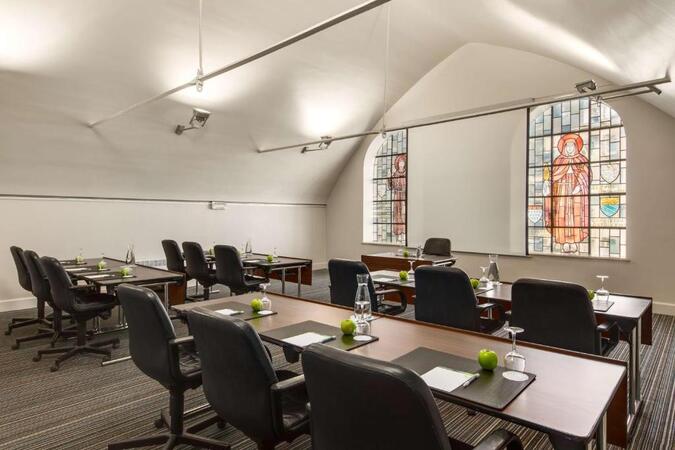
NH Hotel Bruges, Boeveriestraat 2, Bruges, Belgium, 8000
Bruges became a central port, commercial and financial hub in medieval Europe, linking the countries of the North Sea and the Baltic to the Mediterranean. Wealthy merchants from Bruges traded with those from all over Europe. The first stock exchange in history was born in Bruges in the 13th century. In the 15th century it was the leading financial center in Europe. This economic boom also leads to a cultural and artistic flowering that has left an abundant heritage. It was the most important center for the Flemish primitive painters, who revolutionized Western painting. It has been a member of the Organization of World Heritage Cities since the year 2000. The city even has the distinction of appearing three times on the UNESCO World Heritage List. For its historic center, for its beguinage which is part of the Flemish Beguinages and for its belfry included among the Belfries of Belgium and France. In addition, it is also listed as Intangible Cultural Heritage of Humanity by UNESCO for its Procession of the Holy Blood.
This instructor-led, live training in Brugge introduces ChatGPT for professionals seeking to boost productivity. Learn to craft effective prompts, handle daily tasks, and understand AI limitations through interactive lectures, exercises, and hands-on lab environments tailored to real-world workflows.
This instructor-led, live training in Brugge guides intermediate professionals on designing and scaling agentic AI for business automation. Learn to map workflows, integrate tools, and build practical use cases in customer service, supply chain, and marketing, ensuring measurable impact.
This hands-on training in Brugge helps non-technical professionals overcome AI fears and master practical applications. Learn to craft effective prompts, use AI for writing and organization, and adopt responsible practices to boost daily productivity and creativity.
This instructor-led, live training in Brugge empowers intermediate professionals to master ChatGPT and Microsoft 365 Copilot for advanced productivity. Participants learn to automate document creation, analyze complex data, and streamline communication across Excel, PowerPoint, and Outlook.
This instructor-led training in Brugge introduces foundational AI concepts for business professionals, focusing on practical applications in process automation, administrative tasks, and decision support, helping participants enhance efficiency and productivity in modern work environments.
This live training in Brugge helps non-technical corporate professionals apply AI tools like ChatGPT and Copilot to boost productivity and streamline workflows. Participants will learn to create structured prompts, automate routine tasks, and implement safe adoption strategies for their teams.
This instructor-led, live training in Brugge (online or onsite) is aimed at beginner-level administrative operatives who wish to have a basic understanding of AI and its applications in administrative tasks.
By the end of this training, participants will be able to:
Understand the basics of Artificial Intelligence (AI).
Learn how AI can be integrated into daily administrative tasks.
Improve efficiency in sending emails, conducting surveys, managing indicators, maintaining records, and performing manual validations through AI tools.
Discover how AI tools like ChatGPT and Copilot can enhance your productivity in this live training delivered in Brugge. Learn to automate repetitive tasks, streamline communication, and apply ethical guidelines. Ideal for beginners and managers seeking to safely integrate AI into daily operations.
This instructor-led, live training in Brugge (online or onsite) is aimed at all-level administrative professionals who wish to leverage AI tools to automate routine tasks, enhance document handling, improve presentations, and optimize workflows in the office environment.
By the end of this training, participants will be able to:
Understand the basics of AI and how it applies to administrative roles.
Use generative AI tools to write, summarize, and translate content.
Automate calendar management, emails, and routine tasks.
Design and implement an AI-assisted workflow specific to their role.
This instructor-led, live training in Brugge (online or onsite) is aimed at beginner-level to intermediate-level professionals from various departments who wish to learn how to efficiently use AI tools for daily tasks, saving time and improving productivity.
By the end of this training, participants will be able to:
Identify AI-powered tools suitable for different tasks.
Automate repetitive processes to improve workflow efficiency.
Leverage AI for better communication, reporting, and decision-making.
Ensure responsible and ethical AI usage in the workplace.
This instructor-led, live training in Brugge (online or onsite) is aimed at intermediate-level to advanced-level developers and AI hobbyists who wish to create advanced AI workflows in n8n.
By the end of this training, participants will be able to:
Understand the integration of AI services with n8n workflows.
Implement AI-driven decision-making in automated processes.
Create custom AI nodes and use pre-built AI nodes in n8n.
analyze and optimize the performance of AI workflows.
This instructor-led live training in Brugge is designed for non-technical professionals seeking to understand AI fundamentals. Participants will learn to identify AI tools, enhance daily workflows, and integrate simple AI processes to boost decision-making and overall workplace efficiency.
This instructor-led, live training in Brugge (online or onsite) is aimed at beginner-level / intermediate-level / advanced-level professionals who wish to use Artificial Intelligence in Project Management and Agile Methodologies to shift from manual coordination to data-driven orchestration. This category focuses on leveraging Machine Learning and Large Language Models to solve traditional "bottlenecks" in the software development lifecycle (SDLC). By applying AI to areas like GitOps, capacity planning, and requirements engineering, organizations can achieve higher precision in forecasting and significantly reduce the time spent on administrative overhead. This methodology helps teams focus on high-value creative work while AI handles the complexity of data processing and scenario planning.
By the end of this training, participants will be able to:
Understand the technical foundations of Transformers, LLMs, and SLMs.
Critically evaluate AI tools based on cost, latency, data privacy, and vendor lock-in.
Master advanced prompt engineering and RAG techniques for professional use.
Integrate AI into the full Agile lifecycle, from ideation and backlog refinement to risk management.
Identify and mitigate risks related to AI ethics, biases, hallucinations, and "model collapse."
Apply "model-based problem solving" to complex engineering and management tasks.
This instructor-led, live training in Brugge (online or onsite) is aimed at beginner-level / intermediate-level / advanced-level professionals who wish to transform traditional architectural workflows into AI-native processes. Rather than replacing the architect's creativity, we focus on augmenting it - using Artificial Intelligence to handle repetitive tasks, accelerate conceptualization, and automate administrative burdens. The workshop bridges the gap between raw sketches and high-end professional presentations.
By the end of this training, participants will be able to:
Generate 3-5 conceptual variants in the time it previously took to create one.
Perform independent high-end post-production on renderings, eliminating the need for external outsourcing for minor corrections.
Utilize Multimodal AI (Gemini/GPT) to analyze complex legal building codes and technical documentation.
Implement automated administrative workflows to recover a few hours of manual work per week.
A company hackathon lets teams from departments and IT try AI on their own problems and take working solutions with them. The format combines two discovery sessions beforehand with tool onboarding, a 24-hour sprint and a pitch to the management. Each team ends with a working solution and a usage plan for the following week.
This instructor-led, live training in Brugge is aimed at: Mixed teams from departments and IT who want to try AI on their own problems and take working solutions with them.
By the end of this training, participants will be able to:
Formulate problems and bottlenecks in the own area as solvable challenges
Know eight to ten AI tools and select one for a task
Build a working solution in small teams
Evaluate solutions by benefit and feasibility
Present the result in a pitch
Define a plan for use in the following week
Format of the Course
Duration: 2 days on site (including a 24-hour sprint) plus two discovery sessions beforehand
Interactive training with a trainer, discussion and hands-on exercises on the participants' own use cases
Outcome, Beforehand: Challenges, tool selection and success criteria are defined.
Outcome, Day 1: Each team has a sharpened challenge and a first working version.
Outcome, Day 2: Each team has a working solution, a presented pitch and a plan for use from the following week.
Course Customization Options
To request a customized training for this course, please contact us to arrange.
Strategic AI Implementation for Operational Excellence in Brugge moves teams beyond basic chatbot use. It covers advanced prompt engineering, enterprise data security, and department-specific automation for Legal, Procurement, and Quality Management workflows to drive operational success.
In today's fast-paced Financial Services Industry (FSI), adopting AI productivity tools is no longer optional—it is a baseline requirement for operational competitiveness. This program is engineered to establish organization-wide AI literacy, equipping employees across claims, underwriting, actuary, strategy, and operations with safe, structured prompt engineering and automation techniques.
Format of the Course
Interactive lecture and discussion.
Lots of exercises and practice.
Hands-on implementation in a live-lab environment.
Course Customization Options
To request a customized training for this course, please contact us to arrange.
This instructor-led, live training in Brugge (online or onsite) is aimed at senior managers and department heads who wish to build the knowledge and roadmap needed to start implementing AI within their own teams and business areas.
This instructor-led, live training in Brugge (online or onsite) is aimed at IT support professionals who wish to use AI tools and automation platforms to streamline support processes, standardize responses, and reduce manual documentation effort.
This hands-on workshop is tailored to the tasks of one team and uses the AI tool already approved in the company. It covers prompting techniques, lasting setups such as projects and assistants, working with files and safe use. The group leaves with a shared prompt collection and solved tasks from its own daily work.
This instructor-led, live training in Brugge is aimed at: Teams from case processing, specialist departments, research or IT support who already have first experience with AI and want better results for their own tasks.
By the end of this training, participants will be able to:
Understand what happens in the model when prompting and why models invent details
Write instructions with role, task, context, examples, format and limits
Break down large tasks and improve results in a targeted way
Use instructions, memory, projects and own assistants on a lasting basis
Work with files, scans, tables and research assignments
Verify results, recalculate figures and protect data
Secure own templates for the group and reuse them
Format of the Course
Duration: 1 day (7 hours) or 2 sessions of 4 hours per group, online or on site, up to 15 participants
Interactive training with a trainer, discussion and hands-on exercises on the participants' own use cases
Outcome, Block 1: Each participant has at least one verified template for their own work.
Outcome, Block 2: Each group has a shared prompt collection, a shared project and two solved tasks from real daily work.
Course Customization Options
To request a customized training for this course, please contact us to arrange.
Browser agents can read web pages, compare vendors and fill in forms on behalf of the user. This one-day course covers ChatGPT Agent and Atlas, Claude in Chrome and Perplexity Comet, suitable tasks and the risks, such as hidden instructions on web pages. Participants hand over two tasks, verify the results and define rules for the team.
This instructor-led, live training in Brugge is aimed at: Specialist users, assistants and researchers who want to hand over recurring work on web pages and in web applications to AI agents.
By the end of this training, participants will be able to:
Understand how browser agents read pages, click and fill in forms
Classify ChatGPT Agent and Atlas, Claude in Chrome and Perplexity Comet
Select suitable tasks such as research, comparisons and form work
Formulate assignments with goal, limits and approval points
Recognize and limit risks such as hidden instructions on web pages
Define rules for use in the team
Format of the Course
Duration: 1 day (7 hours)
Interactive training with a trainer, discussion and hands-on exercises on the participants' own use cases
Outcome, Day 1: Each participant has handed over two tasks to a browser agent, verified the results and defined rules for use in the team.
Course Customization Options
To request a customized training for this course, please contact us to arrange.
This hands-on training in Brugge covers Canva core tools and advanced design techniques, empowering participants to create professional visuals efficiently. Learn to leverage AI features for automation and generate graphics, enhancing your workflow and design quality in real-world business contexts.
ChatGPT includes projects, custom GPTs, deep research, connectors and an agent mode in addition to the chat. This two-day course moves from everyday use to shared projects, custom GPTs and multi-step tasks, with clear rules for the team. Participants work with their own anonymized material throughout.
This instructor-led, live training in Brugge is aimed at: Employees and teams who use ChatGPT Plus, Business or Enterprise and want to move from single chats to projects, custom GPTs and agents.
By the end of this training, participants will be able to:
Classify the models, plans and data protection options of ChatGPT
Achieve lasting better results with instructions, memory and projects
Analyze files, tables and data and cross-check the results
Edit texts in Canvas and create graphics for presentations
Build a custom GPT without code and share it in the workspace
Use deep research, connectors and the ChatGPT agent for multi-step tasks
Define limits, approval points and rules for use in the team
Format of the Course
Duration: 2 days (7 hours each)
Interactive training with a trainer, discussion and hands-on exercises on the participants' own use cases
Outcome, Day 1: Each participant has own standing instructions, a verified data analysis and a revised text from their daily work.
Outcome, Day 2: Each participant has a project, a shared custom GPT and a verified piece of research. The team knows the agent, connectors and its own rules.
Course Customization Options
To request a customized training for this course, please contact us to arrange.
Claude Cowork takes over whole tasks such as research, document preparation and file work instead of answering one prompt at a time. This course teaches how to write good assignments, check the plan and review the results. Participants hand over three real tasks and set up a scheduled task.
This instructor-led, live training in Brugge is aimed at: Knowledge workers, assistants, project and department leads who want to hand over entire tasks to Claude instead of chatting step by step.
By the end of this training, participants will be able to:
Understand the difference between chat and delegated work in Cowork
Formulate assignments with goal, material, limits and acceptance criteria
Have documents, spreadsheets and presentations created from a folder
Hand over research from the question to the finished report
Use plugins, skills and connectors in Cowork
Define approval points, backups and safe folder access
Format of the Course
Duration: 1 day (7 hours)
Interactive training with a trainer, discussion and hands-on exercises on the participants' own use cases
Outcome, Day 1: Each participant has handed over three real tasks to Cowork, reviewed the results and set up a scheduled task.
Course Customization Options
To request a customized training for this course, please contact us to arrange.
Claude offers far more than a chat window: projects, artifacts, skills, connectors and Cowork can take over recurring work in administration, finance, purchasing and HR. This two-day course shows how the pieces fit together and how to set them up for your own use case. Participants leave with a working project, a custom skill and a routine they can use the following week.
This instructor-led, live training in Brugge is aimed at: Employees from administration, finance, purchasing, HR, project and process management who use or are introducing Claude in their company and want to go beyond the chat.
By the end of this training, participants will be able to:
Classify Claude's models and interfaces and choose the right one for each task
Set up projects with instructions and knowledge files so that work does not start from zero every time
Use artifacts to create reports, tables, overviews and small interactive tools
Write, test and share a custom skill for a recurring task
Set up connectors to mailbox, calendar and file storage and limit access deliberately
Hand over tasks to Claude Cowork and routines and review the results
Define rules for data protection, review steps and shared templates in the team
Format of the Course
Duration: 2 days (7 hours each)
Interactive training with a trainer, discussion and hands-on exercises on the participants' own use cases
Outcome, Day 1: Each participant has a set-up project for their use case, two improved templates and a first artifact built from real material.
Outcome, Day 2: Each participant leaves the course with a working skill, a connected connector, a set-up routine and a plan for the next 30 days.
Course Customization Options
To request a customized training for this course, please contact us to arrange.
This instructor-led, live training in Brugge (online or onsite) is aimed at senior leaders and executives who wish to harness Claude as a strategic business assistant to enhance decision-making, accelerate planning and build competitive advantage through AI-augmented leadership.
This instructor-led, live training in Brugge equips legal and financial professionals with practical AI skills. It covers prompt engineering, contract analysis, and case management. Participants will learn to automate workflows, draft documents, and ensure responsible AI use.
Skills turn a recurring task into a reusable procedure that Claude follows in the same way every time. This course shows how to find the right tasks, write skills, test them and share them in the team. Each participant builds and tests a skill for a real task.
This instructor-led, live training in Brugge is aimed at: Specialist users and key users who want to handle recurring tasks in the team consistently and with the same quality using Claude.
By the end of this training, participants will be able to:
Understand what a skill is and how it differs from a project, an instruction and an agent
Find tasks that are worth turning into a skill
Write a skill with description, workflow, examples and templates
Test skills on real cases and improve them
Distribute, version and maintain skills in the team
Combine skills with connectors and Cowork
Format of the Course
Duration: 1 day (7 hours)
Interactive training with a trainer, discussion and hands-on exercises on the participants' own use cases
Outcome, Day 1: Each participant has a tested skill for a real, recurring task that is shared in the team, and a list of further candidates.
Course Customization Options
To request a customized training for this course, please contact us to arrange.
Teams in administration, accounting, legal, purchasing, warehouse and customer service can save time when Claude is set up for their own documents and routines. This modular course combines a shared foundations day with department days built around real documents. Each department leaves with at least one workflow that runs faster from the following week.
This instructor-led, live training in Brugge is aimed at: Teams from administration, accounting, legal, purchasing, warehouse and customer service in mid-sized companies, from beginners to advanced users.
By the end of this training, participants will be able to:
Use Claude for the tasks of the own department instead of only as a chatbot
Build projects and knowledge files for the own department
Review and compare contracts, invoices and receipts with Claude and extract data from them
Prepare inquiries, quotations and multilingual customer communication faster and with consistent quality
Connect Claude with Outlook and file storage and automate first recurring workflows
Define at least one workflow per department that runs faster from the following week
Format of the Course
Duration: 3 days, modular (one shared foundations day and two department days)
Interactive training with a trainer, discussion and hands-on exercises on the participants' own use cases
Outcome, Day 1: All participants work confidently with Claude, and each team has its own department project with real documents.
Outcome, Day 2: Administration and finance each have one workflow that runs faster with Claude and a tested skill.
Outcome, Day 3: Each department has at least one concrete workflow that runs faster from now on, and the team knows the next steps toward automation.
Course Customization Options
To request a customized training for this course, please contact us to arrange.
Agents allow teams to answer knowledge questions and support document processes in a controlled way. This two-day course covers Agent Builder on day 1 and Copilot Studio with approval steps and test cases on day 2. Participants leave with a tested knowledge agent and a draft for a Studio agent.
This instructor-led, live training in Brugge is aimed at: Key users, AI champions and department leads who want to build their own Copilot agents for knowledge questions and document processes.
By the end of this training, participants will be able to:
Decide when Copilot Chat is enough and when an agent makes sense
Build a knowledge agent in Agent Builder with audience, knowledge sources and limits
Understand the structure of an agent in Copilot Studio and create a first agent
Break down document processes into reviewable steps with human approval
Test agents with test cases and acceptance criteria
Classify roles, permissions, licenses and operation
Format of the Course
Duration: 2 days (7 hours each)
Interactive training with a trainer, discussion and hands-on exercises on the participants' own use cases
Outcome, Day 1: Each participant has a tested knowledge agent and a tool map for their own work cases.
Outcome, Day 2: Each participant has a draft for a Studio agent with approval, two tested process cases and a roadmap for their own use cases.
Course Customization Options
To request a customized training for this course, please contact us to arrange.
Project work in Microsoft 365 spreads across Teams, Planner, Lists and SharePoint, and much of the effort goes into status reports and follow-up. This one-day course shows how Copilot and agents can support status reporting, meetings, tasks and risk detection. Participants build a project knowledge agent and a mock-up for a real project problem.
This instructor-led, live training in Brugge is aimed at: Project managers, PMO staff, team assistants and project members who work in Microsoft 365 with Teams, Planner, Lists and SharePoint.
By the end of this training, participants will be able to:
Classify the agents in Microsoft 365 for project work
Create status reports from emails, meetings and lists with Copilot
Use agents in Teams and Planner for meetings and tasks
Build a project knowledge agent with documents, lessons learned and contacts
Make risks and delays visible earlier
Build a solution for a real project problem as a mock-up and present it
Format of the Course
Duration: 1 day (7 hours)
Interactive training with a trainer, discussion and hands-on exercises on the participants' own use cases
Outcome, Day 1: Each participant has a status report, a tested project knowledge agent and a presented mock-up for a real project problem.
Course Customization Options
To request a customized training for this course, please contact us to arrange.
Gemini and NotebookLM are available directly in Google Workspace and can support mail, documents, tables, presentations and research. This one-day course covers the tools, Gems and NotebookLM notebooks on the participants' own sources. The focus is on workflows that can be reused in daily work.
This instructor-led, live training in Brugge is aimed at: Employees and teams who work with Google Workspace and want to use Gemini and NotebookLM in daily work.
By the end of this training, participants will be able to:
Classify Google's AI tools and choose the right one for each task
Use Gemini productively in Gmail, Docs, Sheets, Slides and Meet
Create Gems as reusable assistants
Create briefings, audio overviews and learning material from own sources with NotebookLM
Use deep research for research with sources
Create images and short videos for presentations and know the limits
Format of the Course
Duration: 1 day (7 hours)
Interactive training with a trainer, discussion and hands-on exercises on the participants' own use cases
Outcome, Day 1: Each participant has an own Gem, a NotebookLM notebook with own sources and a verified Workspace workflow for their work.
Course Customization Options
To request a customized training for this course, please contact us to arrange.
Artificial Intelligence (AI) is no longer a distant concept—it is a part of our everyday personal and professional lives. From chatbots and image recognition to document analysis and voice assistants, AI technologies are reshaping how we work, communicate, and make decisions.
This beginner-friendly course provides participants with a clear and accessible introduction to AI, without requiring a technical background. Through simple explanations, real-life examples, and interactive activities, attendees will understand what AI is, how it works, and how to use it responsibly and effectively.
An assistant on company documents can answer questions about policies, manuals and processes and name the source. This course shows how to prepare documents, choose a platform, build the agent without code and measure its answers with a question catalog. Participants also write a maintenance plan.
This instructor-led, live training in Brugge is aimed at: Teams, knowledge owners and key users who want to provide answers from their own documents, policies and manuals.
By the end of this training, participants will be able to:
Understand how AI answers from documents (RAG explained simply) and where the limits are
Prepare documents so that answers are correct
Choose the right platform for a knowledge agent
Build and share a knowledge agent without code
Verify answers with a question catalog and source references
Define maintenance, roles and currency of content in operation
Format of the Course
Duration: 1 day (7 hours)
Interactive training with a trainer, discussion and hands-on exercises on the participants' own use cases
Outcome, Day 1: Each participant has a shared knowledge agent on their own documents, a measured hit rate and a maintenance plan.
Course Customization Options
To request a customized training for this course, please contact us to arrange.
Langdock brings several AI models, assistants, company knowledge and workflows into one platform for the company. This course covers daily use in chat, building and sharing assistants, connecting knowledge sources and setting up a workflow with human approval. It also covers rules for data, roles and rollout.
This instructor-led, live training in Brugge is aimed at: Departments and key users in companies that use or are introducing Langdock as a central AI platform.
By the end of this training, participants will be able to:
Operate Langdock confidently, including chat, models, assistants, knowledge and workflows
Choose a suitable model for each task
Build assistants with instructions and company knowledge and share them in the team
Connect SharePoint, OneDrive and other sources as a knowledge base
Set up a simple workflow with human approval
Define rules for data, roles and approvals in the company
Format of the Course
Duration: 2 days (7 hours each), also available as 4 half days online
Interactive training with a trainer, discussion and hands-on exercises on the participants' own use cases
Outcome, Day 1: Each participant has a template, a knowledge folder and a shared assistant for their own area.
Outcome, Day 2: Each participant has a running workflow with approval, a connected knowledge source and a plan for the next 30 to 60 days.
Course Customization Options
To request a customized training for this course, please contact us to arrange.
Lovable builds web applications from natural language prompts, which makes it useful for internal tools, forms, dashboards and prototypes. This one-day course covers the interface, prompting, database, login and publishing, and ends with a published app and a started own use case. No programming skills are required.
The trainer, Tim Jamboula, is an official Lovable Ambassador and Cursor Ambassador.
This instructor-led, live training in Brugge is aimed at: Specialist users, project leads, founders and teams who want to build internal tools, forms, dashboards or prototypes themselves.
By the end of this training, participants will be able to:
Understand how AI-assisted building works and when Lovable is the right tool
Operate the interface confidently, including Plan, Build and Visual Edits
Prompt according to five principles and use knowledge and skills
Set up database, login, storage and connectors
Publish an app safely and use the security scan
Start an own use case and know the next steps
Format of the Course
Duration: 1 day (7 hours)
Interactive training with a trainer, discussion and hands-on exercises on the participants' own use cases
Outcome, Day 1: Each participant has a published app with a database, login and live URL, and a started own use case.
Course Customization Options
To request a customized training for this course, please contact us to arrange.
Clickable prototypes created in hours can replace static mockups in discovery and stakeholder reviews. This one-day course shows product managers and designers how to build variants, map a design system, run live reviews and prepare the handover to development. Participants finish with a prototype for a feature of their own.
The trainer, Tim Jamboula, is an official Lovable Ambassador and Cursor Ambassador.
This instructor-led, live training in Brugge is aimed at: Product managers, product owners, UX, UI and service designers, and discovery teams.
By the end of this training, participants will be able to:
Master the path from briefing to clickable prototype in a single session
Build several variants in parallel and refine them with user feedback
Map a design system, components and brand rules in Lovable
Run stakeholder reviews with working prototypes and live changes
Decide when to hand over to development and prepare the handover
Format of the Course
Duration: 1 day (7 hours)
Interactive training with a trainer, discussion and hands-on exercises on the participants' own use cases
Outcome, Day 1: Each participant has a clickable prototype for an own feature, a stored design system and a handover document for development.
Course Customization Options
To request a customized training for this course, please contact us to arrange.
This two-day course takes a team from a short briefing to a tested, published first version. It covers prototypes, data and roles, live iteration with stakeholders, testing with users, security, publishing and the handover to developers. Participants work on their own use case throughout.
The trainer, Tim Jamboula, is an official Lovable Ambassador and Cursor Ambassador.
This instructor-led, live training in Brugge is aimed at: Product teams, innovation managers, founders and departments who want to turn an idea into a tested prototype and a usable first version.
By the end of this training, participants will be able to:
Build a clickable prototype from a short briefing
Iterate prototypes live with stakeholders
Set up data, roles, login and integrations
Test with real users and implement feedback
Prepare security, publishing and operation of a first version
Plan the handover to a developer team
Format of the Course
Duration: 2 days (7 hours each), 6 to 12 participants
Interactive training with a trainer, discussion and hands-on exercises on the participants' own use cases
Outcome, Day 1: Each participant has a prototype with a database and login that has been improved in a simulated stakeholder session.
Outcome, Day 2: Each participant has a published, tested first version of their use case and a handover document.
Course Customization Options
To request a customized training for this course, please contact us to arrange.
Microsoft 365 Copilot is built into Outlook, Teams, Word, Excel and PowerPoint and works with the data that users already have access to. This course shows how to prompt effectively, verify results and use Notebooks, Pages and agents. Participants finish with a first FAQ agent on a SharePoint knowledge base.
This instructor-led, live training in Brugge is aimed at: Employees and departments with Microsoft 365 Copilot, from beginners to advanced users.
By the end of this training, participants will be able to:
Distinguish Copilot Chat and the Copilots in Outlook, Teams, Word, Excel and PowerPoint
Understand which data Copilot accesses and how permissions apply
Prepare emails, meetings, reports and presentations with Copilot
Analyze Excel data and verify the results
Prompt effectively and respond when the first answer does not hold up
Use Notebooks, Pages and the Researcher and Analyst agents
Build a first simple agent on a SharePoint knowledge base
Format of the Course
Duration: 2 days (7 hours each), also available as a learning journey in 2-hour sessions
Interactive training with a trainer, discussion and hands-on exercises on the participants' own use cases
Outcome, Day 1: Each participant has implemented at least one use case in the apps and has two saved prompts for their own work.
Outcome, Day 2: Each participant has a notebook, a verified Researcher result and a tested FAQ agent. Each group has presented a solution idea with a mock-up.
Course Customization Options
To request a customized training for this course, please contact us to arrange.
Many recurring tasks can be handed to an AI agent without writing code, provided the task, the knowledge and the control points are defined well. This two-day course guides participants from a task profile to a tested agent with tools, approval points and operating documentation. Each participant works on a workflow from their own area.
This instructor-led, live training in Brugge is aimed at: Specialist users, key users and process owners who want to hand over recurring work to AI agents.
By the end of this training, participants will be able to:
Understand what distinguishes an AI agent from a chat and an assistant
Find tasks that are worth giving to an agent
Plan an agent with goal, instructions, knowledge, tools and limits
Build an agent without code and test it on real cases
Build in approval points and human control
Assess maintenance, costs and risks in operation
Format of the Course
Duration: 2 days (7 hours each)
Interactive training with a trainer, discussion and hands-on exercises on the participants' own use cases
Outcome, Day 1: Each participant has an agent profile and a first, tested agent for an own workflow.
Outcome, Day 2: Each participant has an agent with a tool, an approval point, test cases and short operating documentation.
Course Customization Options
To request a customized training for this course, please contact us to arrange.
Reliable research needs more than a quick answer: sources have to be selected, checked and documented. This course covers Perplexity Spaces, deep research, Labs and the Comet browser, with a strong focus on source checking. Participants leave with a Space, a verified piece of research and a template for recurring assignments.
This instructor-led, live training in Brugge is aimed at: Employees who research regularly, for example in purchasing, project work, knowledge management, assistance and specialist departments.
By the end of this training, participants will be able to:
Understand how Perplexity searches, selects sources and forms answers
Formulate research assignments with question, sources, exclusions and format
Check sources systematically and recognize errors in citations
Set up Spaces with instructions and files for topics and teams
Use deep research and Labs for reports and tables
Use the Comet browser safely for research and tasks on web pages
Format of the Course
Duration: 1 day (7 hours)
Interactive training with a trainer, discussion and hands-on exercises on the participants' own use cases
Outcome, Day 1: Each participant has an own Space, a verified piece of research with sources and a template for recurring research assignments.
Course Customization Options
To request a customized training for this course, please contact us to arrange.
A personal AI agent can sort email, plan appointments, prepare briefings and run routines such as a morning overview. This one-day course shows how to set it up with a personal context, connectors and clear rules for approval and data protection. Participants leave with a working agent and two running routines.
This instructor-led, live training in Brugge is aimed at: Professionals, assistants, project managers and self-employed people who want to set up a personal AI agent for their own work.
By the end of this training, participants will be able to:
Understand what a personal AI agent can take over and what it cannot
Build a personal context with profile, instructions and notes
Organize email and calendar with AI without giving up control
Prepare appointments and conversations with automatic briefings
Set up routines such as a morning overview and a weekly review
Define approvals, data protection and limits for the own agent
Format of the Course
Duration: 1 day (7 hours)
Interactive training with a trainer, discussion and hands-on exercises on the participants' own use cases
Outcome, Day 1: Each participant has a set-up personal agent with a profile, a connected mailbox and calendar, and two running routines.
Course Customization Options
To request a customized training for this course, please contact us to arrange.
Online AI for Business Productivity training in Brugge, AI for Everyday Work training courses in Brugge, Weekend AI for Business Productivity courses in Brugge, Evening AI for Everyday Work training in Brugge, AI for Business Productivity instructor-led in Brugge, AI for Office Productivity trainer in Brugge, Evening AI for Business Productivity courses in Brugge, AI for Business Productivity one on one training in Brugge, AI for Business Productivity instructor in Brugge, AI for Everyday Work coaching in Brugge, Weekend AI for Everyday Work training in Brugge, AI for Business Productivity on-site in Brugge, AI for Everyday Work instructor-led in Brugge, Online AI for Business Productivity training in Brugge, AI for Business Productivity boot camp in Brugge, AI for Business Productivity private courses in Brugge, AI for Office Productivity classes in Brugge